How do you make a QR code?
Pick the kind of code (website, Wi-Fi, contact, text, email, SMS or phone), fill in the fields and download it as a PNG for screens or an SVG for print. A link like https://thescience360.com/ fits in a version 2 code of 25 × 25 modules at the default level M, which can rebuild about 15% of the code if part of it is damaged.
These are static codes: the content itself is stored in the pattern, so there is no redirect service, no account and no expiry date. The panel shows exactly what text is stored, how many bytes it takes and how much of the code is spent on error correction. For how that repair works, read how QR codes work and what error correction does.
Key facts about QR codes
- Size grows in steps of 4 modules: version 1 is 21 × 21 and version 40 is 177 × 177, the largest QR code.
- Error correction trades space for robustness: levels L, M, Q and H can restore about 7, 15, 25 and 30% of the codewords. The same link needs version 2 at L and version 4 at H.
- The most a QR code can hold is 2,953 bytes, at version 40 with level L. At level H the limit is 1,273 bytes.
- Leave a quiet zone of 4 modules of plain background on every side. Scanners use it to find the edge of the code.
Six codes people make most
Each example lists what is stored inside the code and loads it on the desk with one tap.
A QR code for a website link
Version 2, level MThe stored text is the address itself, https://thescience360.com/, 26 bytes. At level M that fills a version 2 code (25 × 25 modules) exactly, with 16 of its 44 codewords spent on Reed-Solomon error correction.
If you type an address without https://, the generator adds it, because a scanner needs the scheme to recognise text as a link. Keep links short: a long tracking address can push the code to a larger version with smaller modules.
A Wi-Fi QR code that joins the network
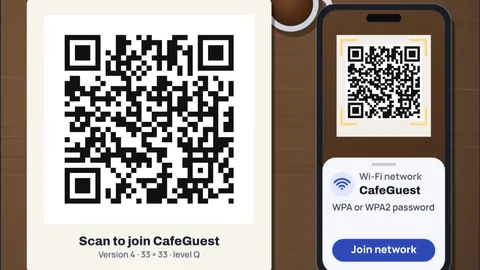
Version 4, level QThe code stores WIFI:T:WPA;S:CafeGuest;P:flat-white-2026;;. T is the security type, S the network name and P the password. A phone camera that reads it offers to join the network without anyone typing the password.
Special characters in the name or password (backslash, semicolon, comma, quote and colon) must be escaped with a backslash, which the generator does for you. Anyone who can photograph the code can read the password, so only print it where you would also write the password on a card.
A contact QR code (vCard)
Version 10, level MA vCard 3.0 block with a name, organisation, job title, phone, email and website takes 203 bytes, which needs version 10, 57 × 57 modules. That is the densest of the common codes, so print it at least as large as a business card allows.
Commas and semicolons inside a value are escaped as RFC 2426 requires, and lines end with a carriage return and line feed. Leave out fields you do not need to keep the code small.
An email QR code with subject and message
Version 8, level MThe code holds a mailto link: the address, then the subject and message with spaces and punctuation written as percent codes. The example takes 127 bytes, version 8.
Scanning opens a new email with everything filled in, and the person still has to press send. Nothing is sent by the code itself.
A text message QR code
Version 3, level MThe stored text is SMSTO:+12025550143:Table 12 is ready, 36 bytes in a version 3 code. The SMSTO form puts the number and message together, and a phone opens its messaging app with both filled in.
As with email, nothing is sent until the person taps send, and the message can still be edited first.
Why level H survives a coffee spill
Error correctionAt level H the same link needs version 4 (33 × 33), and 64 of its 100 codewords are for repair, enough to fix 32 damaged codewords. The spill on the desk covers about 9% of the code. When we ran screenshots of this card through the open source jsQR decoder, the link read back at levels Q and H and failed at L and M.
The price is size: at level L the link fits in version 2. Choose H for codes that will be handled, printed outdoors or covered by a small logo, and L or M for clean screens.
How much a QR code holds
| Version | Modules | L | M | Q | H |
|---|---|---|---|---|---|
| 1 | 21 × 21 | 17 | 14 | 11 | 7 |
| 2 | 25 × 25 | 32 | 26 | 20 | 14 |
| 3 | 29 × 29 | 53 | 42 | 32 | 24 |
| 4 | 33 × 33 | 78 | 62 | 46 | 34 |
| 5 | 37 × 37 | 106 | 84 | 60 | 44 |
| 10 | 57 × 57 | 271 | 213 | 151 | 119 |
| 15 | 77 × 77 | 520 | 412 | 292 | 220 |
| 20 | 97 × 97 | 858 | 666 | 482 | 382 |
| 25 | 117 × 117 | 1,273 | 997 | 715 | 535 |
| 30 | 137 × 137 | 1,732 | 1,370 | 982 | 742 |
| 40 | 177 × 177 | 2,953 | 2,331 | 1,663 | 1,273 |
Bytes of data in byte mode (any text, stored as UTF-8), for each error correction level. Plain digits and upper-case letters pack tighter in their own modes, so a code holding only numbers can store more characters than shown here.
How the generator works
Your fields are turned into the standard text for that kind of code: the address for a link, WIFI:T:…;S:…;P:…;; for Wi-Fi (format from the ZXing project), a vCard 3.0 block for a contact, a mailto link for email, SMSTO for a text message and tel for a phone number.
The text is encoded as UTF-8 bytes in byte mode by an open source implementation of ISO/IEC 18004 (QR Code Generator for JavaScript by Kazuhiko Arase, MIT licence). It picks the smallest version that holds the data at your error correction level, adds the Reed-Solomon codewords, and chooses the mask pattern that scores best under the standard rules.
The card on the desk is drawn with whole screen pixels per module so the code you see scans. The PNG download uses a whole number of pixels per module too, so the actual width can differ a little from the width you ask for; the SVG is a vector and scales to any size.
Nothing you type leaves the page. The codes are static: no redirect, no tracking, no expiry.
What the model leaves out
- Dynamic codes. Services that let you change where a code points store a short link to their own server. Ours stores the content itself, which is permanent but cannot be edited after printing.
- Logos in the middle. A logo hides modules and eats into the error correction. If you add one, use level H, keep it small and test the result.
- Numeric and alphanumeric modes. The generator always uses byte mode, which handles any text. A code holding only digits could be a version or two smaller in numeric mode.
- The smallest codes. For a few small versions, such as 1-L and 2-L, the standard reserves some repair codewords to catch misreads, so the number of codewords that can actually be fixed is slightly lower than shown.
Common misconceptions
"QR codes expire." A static code never expires, because the content is in the pattern. Codes that stop working were dynamic codes whose redirect service was switched off.
"Higher error correction is always better." It makes the code larger and the modules smaller at the same print size, which can make it harder to scan from a distance.
"The white border is wasted space." The quiet zone of 4 modules is part of the standard. Without it, nearby text or a frame can stop a scanner finding the code.
Frequently asked questions
Do these QR codes expire?
No. They are static codes: the link, Wi-Fi details or contact are stored in the pattern itself, so they keep working as long as the content is valid. There is no account and no redirect service that could be switched off.
Which error correction level should I use?
M (about 15% recovery) suits most screens and clean prints. Use Q (25%) or H (30%) for codes that will be handled, printed outdoors or covered by a small logo, and L (7%) when you need to fit a lot of data.
How much data can a QR code hold?
Up to 2,953 bytes of text at version 40 with level L, or 1,273 bytes at level H. In practice keep it under a few hundred bytes so the code stays easy to scan.
Should I download PNG or SVG?
PNG for websites, slides and messages. SVG for print, because it is a vector and stays sharp at any size; most design and print tools accept it.
How do I make a QR code for Wi-Fi?
Choose Wi-Fi, type the network name and password, and pick the security type (WPA for almost all home and café networks). The code stores WIFI:T:WPA;S:name;P:password;; and phones offer to join when they scan it.
Keep learning
How Do QR Codes Work? Error Correction Explained
A QR code at level H still scans with a coffee spill on it; at level L it fails. How modules, codewords and Reed-Solomon repair make that work.
UART Baud Rate Error Tolerance: The Real Budget
A UART tolerates about 4.6% total mismatch at 16x sampling, 3.9% at 8x. Why 115200 on a 16 MHz Arduino is 2.1% off, and why 14.7456 MHz crystals exist.
Why Phone Charging Slows After 80%: The CC-CV Curve
Fast charging fills a phone from 0 to 70% at full current, then a fixed voltage limit makes the current taper. The physics, the plating risk and the math.
How Do Noise Cancelling Headphones Work? The Timing Math
Noise cancelling headphones play inverted sound, but a 20° phase error leaves a third of the noise. Why ANC kills engine drone and not voices, with plots.