How long does it take to charge a phone or laptop?
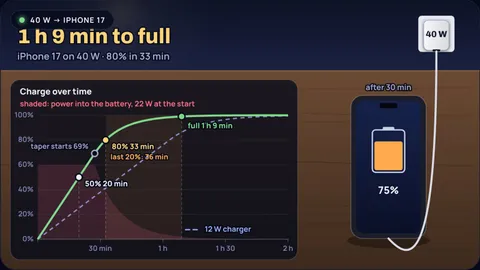
An iPhone 17 on a 40 W charger reaches 50% in about 20 min, 80% in about 33 min and full in about 1 h 9 min. On an old 5 W cube the same phone takes about 3 h 47 min. A 100 W charger is no faster than the 40 W one, because the phone takes only what it can accept. The last 20% takes 36 min on the fast charger and still 38 min on a 20 W one.
The calculator is a model of how lithium ion batteries charge, calibrated to the makers' own published fast-charge figures; it is not a lab measurement. Why phone charging slows after 80 percent explains the physics of the slow finish, the companion post asks whether a bigger charger helps, and the power bank calculator counts charges from a power bank.
Key results from the calculator
- iPhone 17: 20 min to 50% and 1 h 9 min to full on 40 W or more; 1 h 17 min on 20 W; 3 h 47 min on 5 W.
- More watts than the device accepts do nothing: a MacBook Air takes 1 h 29 min on Apple's 140 W adapter and on its 70 W one.
- The last 20% hardly speeds up: 36 min on 40 W against 46 min on 12 W for the iPhone 17, while 0 to 80% falls from 1 h 3 min to 33 min.
- Topping up from 20% to 80% on an iPhone 17 at 40 W takes about 25 min.
Seven devices and chargers
Each example loads the device and the charger. Device limits are set so the model matches the maker's own fast-charge figure.
iPhone 17 on a 40 W adapter
Apple's fast-charge figureApple says the iPhone 17 reaches 50% in around 20 minutes on a 40 W adapter or higher. The model gets 20 min with the phone drawing about 24 W, then the taper starts near 69%.
iPhone 17 on an old 5 W cube
Slow chargerThe small cube that once came in the box gives 5 W. The phone charges at that rate for most of the way, so the whole charge stretches to about 3 h 47 min, and only 16% after half an hour.
Galaxy S25 Ultra on a 45 W adapter
Samsung's fast-charge figureSamsung quotes up to 65% in around 30 minutes with its 45 W adapter. The model matches when the phone takes at most about 28 W. On a 25 W charger it reaches 58% in 30 minutes.
Pixel 10 on a 30 W charger
Google's fast-charge figureGoogle lists up to 55% in about 30 minutes with a 30 W USB-C PPS charger. The model gives 54%, and about 1 h 25 min to full.
iPad Pro 13-inch on a 20 W phone charger
Charger too smallThe 13-inch iPad Pro holds 38.99 Wh, about three times an iPhone. A 20 W phone charger takes about 2 h 43 min; a 60 W capable one brings it down to 1 h 30 min.
MacBook Air 13-inch on a 30 W charger
Small adapterA 53.8 Wh laptop on 30 W takes about 2 h 32 min to fill, if it is asleep. With Apple's 70 W adapter it gets to 50% in about 30 min, Apple's own figure.
MacBook Air 13-inch on a 140 W charger
Charger too bigApple lists its 140 W adapter as fast-charge capable for the MacBook Air, but so is the 70 W one, and both give the same time. The laptop sets the power, about 60 W in the model.
Time to full from empty, by charger (model, 90% efficiency)
| Device | 5 W | 12 W | 20 W | 30 W | 45 W | 65 W | 100 W |
|---|---|---|---|---|---|---|---|
| iPhone 17 | 3 h 47 min | 1 h 49 min | 1 h 17 min | 1 h 9 min | 1 h 9 min | 1 h 9 min | 1 h 9 min |
| Galaxy S25 | 4 h 4 min | 1 h 56 min | 1 h 30 min | 1 h 30 min | 1 h 30 min | 1 h 30 min | 1 h 30 min |
| Galaxy S25 Ultra | 5 h 2 min | 2 h 19 min | 1 h 34 min | 1 h 15 min | 1 h 15 min | 1 h 15 min | 1 h 15 min |
| Pixel 10 | 5 h 1 min | 2 h 18 min | 1 h 33 min | 1 h 25 min | 1 h 25 min | 1 h 25 min | 1 h 25 min |
| iPad Pro 13-inch | 10 h 13 min | 4 h 16 min | 2 h 43 min | 1 h 57 min | 1 h 30 min | 1 h 30 min | 1 h 30 min |
| MacBook Air 13-inch | 14 h 5 min | 5 h 52 min | 3 h 36 min | 2 h 32 min | 1 h 50 min | 1 h 29 min | 1 h 29 min |
Full means 99%: the taper never quite ends, and phones show 100% around there. Times assume the device is idle or asleep, at room temperature, and that charger and cable can both deliver the power. Optimised charging features that pause at 80% are not included.
How the calculator works
Power: the device negotiates with the charger and takes the smaller of the charger's rating and its own limit. The calculator multiplies that by 90% for the losses in the device's charging circuit (adjustable).
Fast stage (constant current): at full power the charge rises in a straight line. The charging rate in C is power divided by battery energy; 1C would fill the battery in an hour if it never slowed.
Slow stage (constant voltage): when the cell reaches its maximum voltage the charger holds it there, and the current falls in proportion to what is left to fill. The switch comes earlier at higher rates, near 69% at 1.5C and near 85% at 0.5C, the same model used in the post on charging after 80%.
Calibration: each device's power limit is set so the model reproduces the maker's published claim: Apple for the iPhone 17, iPad Pro and MacBook Air, Samsung for the Galaxy S25 and S25 Ultra, Google for the Pixel 10.
What the model leaves out
- Using the device while it charges: a laptop under load or a phone running games and navigation can use much of the charger's power.
- Heat: phones cut charging power when warm, and charge slowly or pause when very cold or hot.
- Optimised charging: iPhone, Galaxy and Pixel can hold at 80% and finish later. That is a setting, not the model.
- Cable and charger standards: a cable rated for 60 W, or a charger without the right USB PD or PPS profile, can limit the power below both ratings.
Common misconceptions
"A 100 W charger will fry my phone." The phone only takes what it asks for. Extra capacity in the charger stays unused.
"A bigger charger halves the charging time." Only the fast part speeds up, and only until the device's own limit. The last 20% takes about the same time on any reasonable charger.
"Fast charging means 0 to 100% in 30 minutes." Makers quote 50% or 65% in 30 minutes because the second half is much slower.
Frequently asked questions
Does a higher watt charger charge faster?
Only up to what the device accepts. An iPhone 17 is as fast on 40 W as on 100 W, about 1 h 9 min to full in the model. Below that limit, more watts shorten the fast part of the charge, but the last 20% stays slow.
How long does an iPhone 17 take to charge?
About 20 min to 50% and 1 h 9 min to full on 40 W, 1 h 17 min on 20 W and about 3 h 47 min on an old 5 W charger, in this model.
Why does the last 20% take so long?
Once the battery reaches its maximum voltage the charger holds the voltage steady and the current falls as the cell fills, to avoid overcharging the cathode and plating lithium on the anode.
Can I charge a phone with a laptop charger?
Yes, with a USB-C Power Delivery charger. The phone negotiates its own voltage and takes only the power it needs.
Can I charge a laptop with a phone charger?
Often yes, slowly. A MacBook Air takes about 2 h 32 min on 30 W while asleep, and a 20 W charger may not keep up while it is in use.
Keep learning
Does a Higher Watt Charger Charge Faster? Phones, Tablets and Laptops
An iPhone 17 charges no faster on 100 W than on 40 W, and the last 20% takes about the same time on 20 W. When a bigger charger helps, when it does nothing, and why.

Why Phone Charging Slows After 80%: The CC-CV Curve
Fast charging fills a phone from 0 to 70% at full current, then a fixed voltage limit makes the current taper. The physics, the plating risk and the math.
Why a 10000 mAh Power Bank Does Not Give 10000 mAh to Your Phone
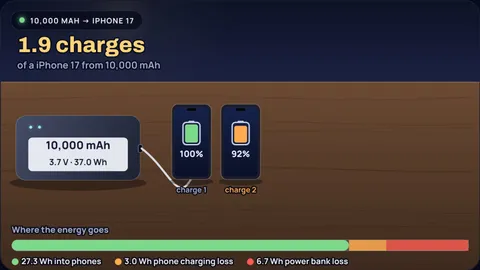
A 10,000 mAh power bank charges a 3,692 mAh iPhone 17 about 1.9 times, not 2.7. Where the missing energy goes: cell voltage, conversion losses and the phone's own charging.
How Does Wireless Charging Work? Coils, Coupling, Heat
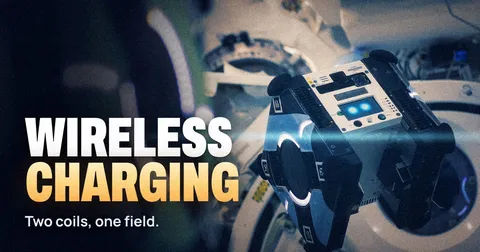
Qi charging is a loosely coupled resonant transformer at 110 to 205 kHz. The coupling maths, why coils are not the main loss, and where heat comes from.