Does a Higher Watt Charger Charge Faster? Phones, Tablets and Laptops
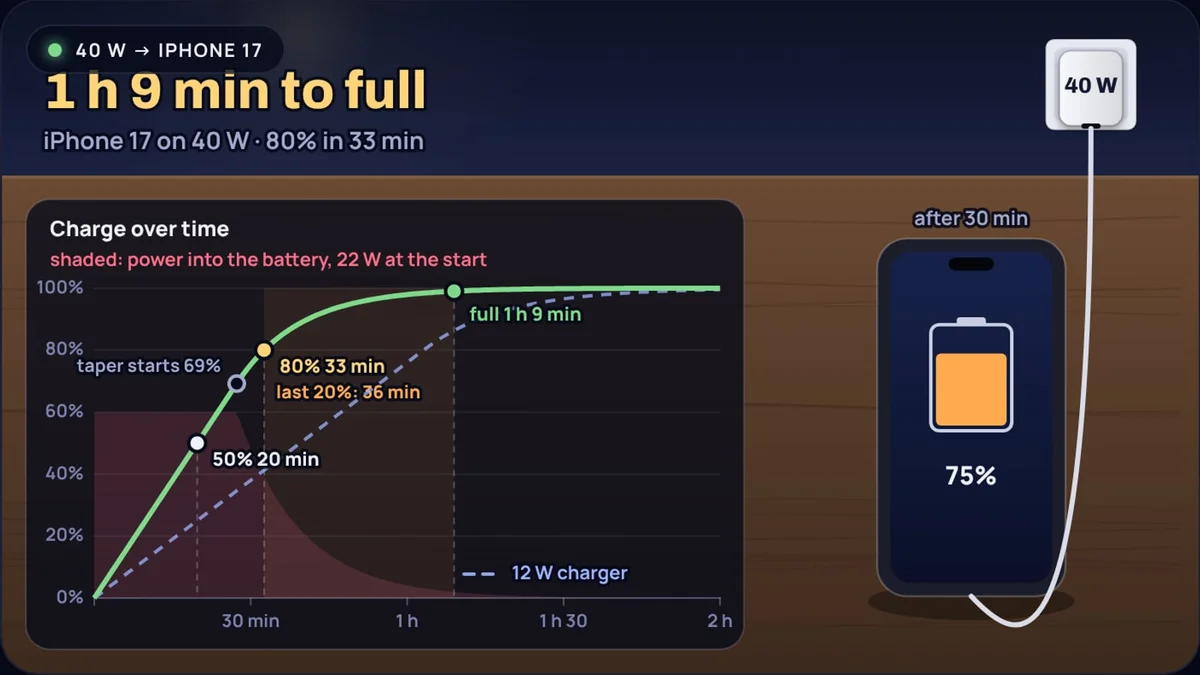
A 100 W charger costs more than a 20 W one, and the box usually says it charges "up to" five times faster. Plug an iPhone 17 into it and you get exactly the same charge as from Apple's 40 W adapter. Plug the same phone into a 20 W charger and you lose only a few minutes. Plug it into the old 5 W cube and it takes more than three times as long.
All three results come from the same two rules: the device decides how much power it takes, and the last stretch of a lithium ion charge is slow whatever you plug in. The charging time calculator draws the charge curve for any device and charger, and every number in this post comes from it.
A note on what the numbers are. The calculator is a model of how lithium ion batteries charge, not a lab measurement. Each device's power limit is set so that the model reproduces the maker's own published fast-charge claim, and the charging circuit is assumed to be 90% efficient. Real phones vary with heat, use and settings.
The device decides how much power it takes
A USB-C charger does not push power into a phone. The phone and charger talk first. Under USB Power Delivery, the standard behind most current chargers, the charger advertises the voltages and currents it can supply and the device asks for one of them. The USB Implementers Forum describes the protocol as letting low power devices "negotiate for only the power they require". The latest version reaches 240 W, but a phone never asks for anything near that.
So the power that flows is the smaller of two numbers: what the charger can give and what the device will take.
Here η is the efficiency of the device's own charging circuit, which turns the USB voltage into the battery's voltage and loses a little as heat. The calculator assumes 90%.
Example 1: an iPhone 17 on a 40 W adapter
Apple says the iPhone 17 reaches 50% in around 20 minutes with a 40 W adapter or higher. The battery is 3,692 mAh, taken at 3.85 V. In the model the phone takes at most about 24 W.
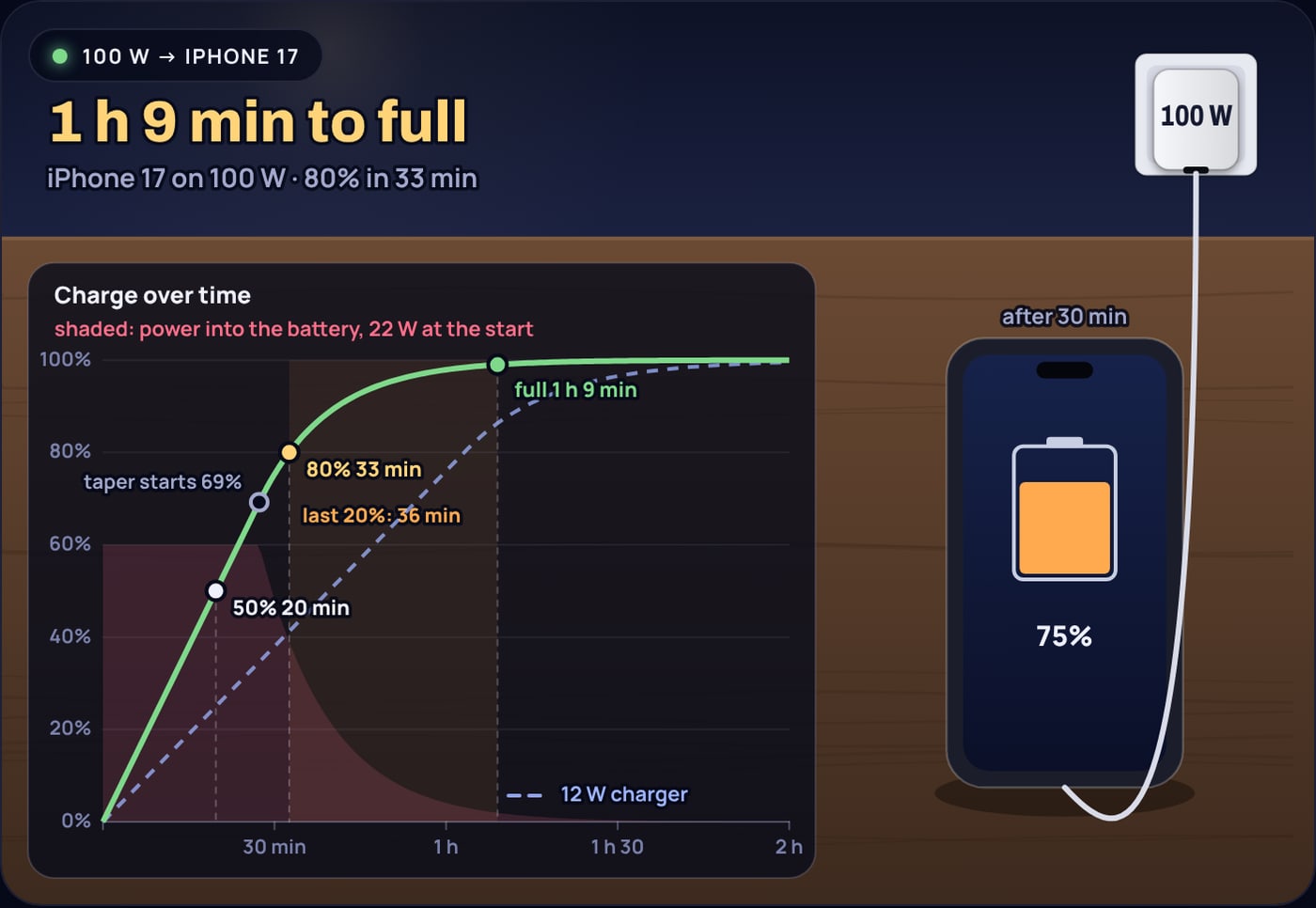
Swap the 40 W adapter for a 100 W one and the minimum is still 24 W, so the answer is still 20 minutes.
How much power does each device accept?
Makers rarely publish a single "maximum watts" figure, and phones briefly draw more at the start of a charge than they average. What they do publish is a time to a given percentage on a given charger. The calculator works backwards from that: each device gets the power limit that makes the model match the claim.
| Device | Maker's claim | Limit in the model |
|---|---|---|
| iPhone 17 (14.2 Wh) | 50% in about 20 min, 40 W or higher (Apple) | 24 W |
| Galaxy S25 (15.4 Wh) | 50% in about 30 min, 25 W (Samsung) | 17 W |
| Galaxy S25 Ultra (19.3 Wh) | 65% in about 30 min, 45 W (Samsung) | 28 W |
| Pixel 10 (19.1 Wh) | 55% in about 30 min, 30 W or higher (Google) | 23 W |
| iPad Pro 13-inch (38.99 Wh) | 50% in about 30 min, 60 W capable adapter (Apple) | 43 W |
| MacBook Air 13-inch (53.8 Wh) | 50% in about 30 min, 70 W adapter (Apple) | 60 W |
Two things stand out. The limits are well below the charger the maker recommends: Samsung sells a 45 W charger for a phone that averages about 28 W in its fast phase. And a charger bigger than the limit is wasted. A Galaxy S25 on a 45 W charger takes the same 1 h 30 min to fill as on 25 W, and a MacBook Air takes the same 1 h 29 min on Apple's 140 W adapter as on its 70 W one.
When does a bigger charger help?
When the charger is below the device's limit, every extra watt goes into the battery, and the fast part of the charge speeds up in proportion. For the iPhone 17:
| Charger | After 30 min | 0 to 50% | 0 to 80% | Last 20% | To full |
|---|---|---|---|---|---|
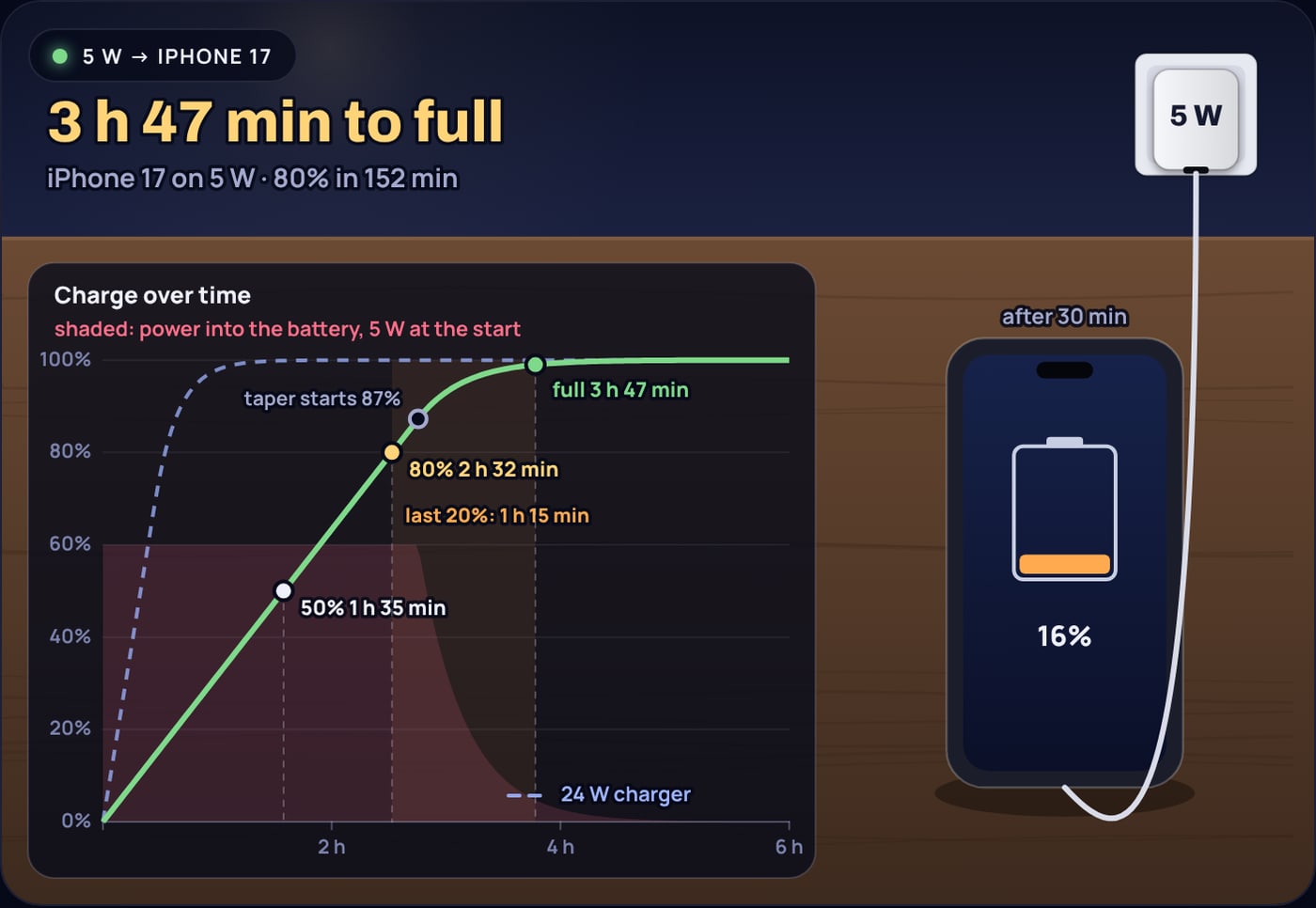
| 5 W | 16% | 95 min | 152 min | 75 min | 3 h 47 min |
| 12 W | 38% | 39 min | 63 min | 46 min | 1 h 49 min |
| 20 W | 63% | 24 min | 38 min | 38 min | 1 h 17 min |
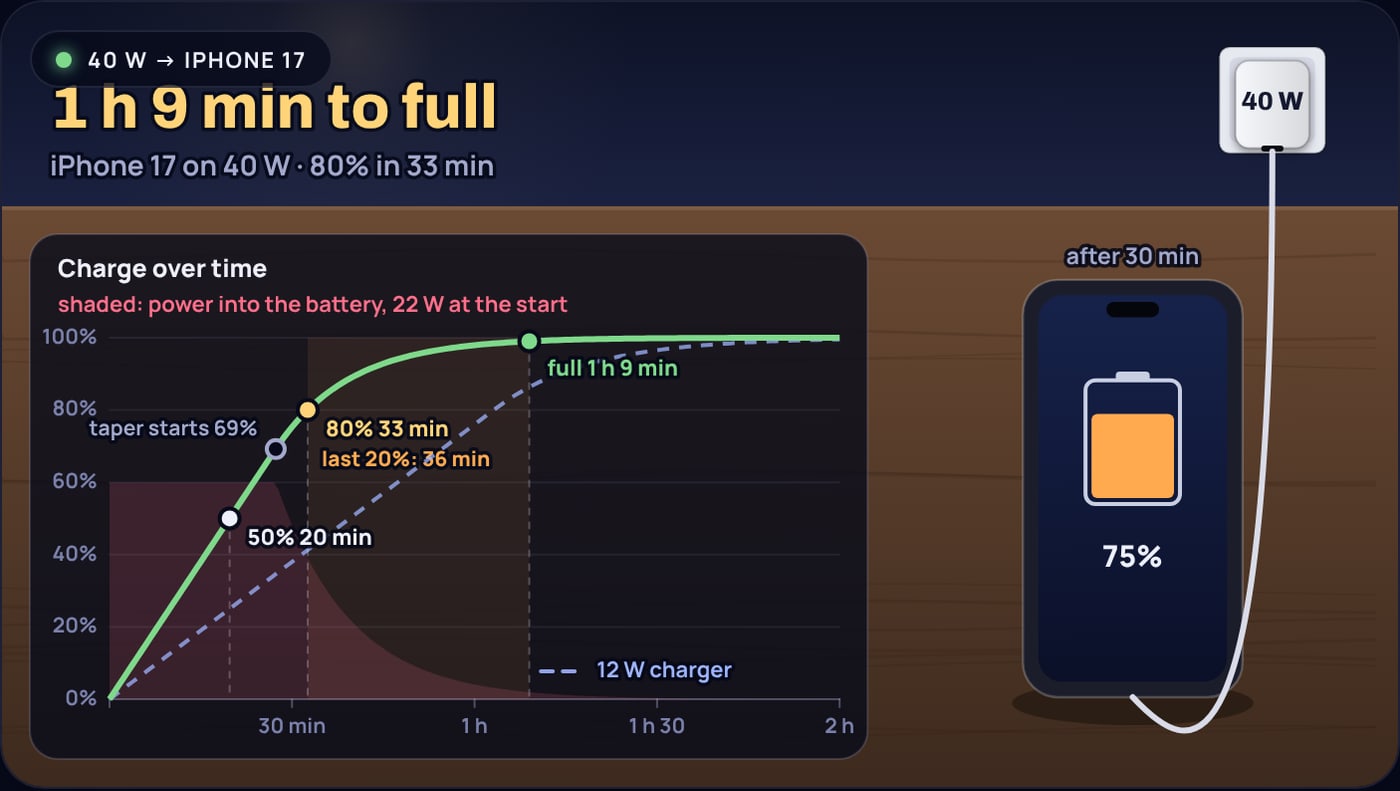
| 40 W | 75% | 20 min | 33 min | 36 min | 1 h 9 min |
| 100 W | 75% | 20 min | 33 min | 36 min | 1 h 9 min |
Going from 5 W to 20 W is a big change: the phone is at 63% after half an hour instead of 16%. Going from 20 W to 40 W saves 5 minutes to 80% and 8 minutes to full, because 20 W is already close to the phone's 24 W limit. Going beyond 40 W saves nothing.
Example 2: the same phone on a 5 W cube
Almost five times longer than on 40 W, because the power is almost five times smaller.
Why the last 20 percent ignores the charger
Look at the last column of the table. From 12 W to 40 W the time to 80% falls from 63 to 33 minutes, but the last 20% only falls from 46 to 36. That is not the phone being cautious. It is how lithium ion cells are charged.
Charging has two stages. In the first, constant current, the charger pushes as much as the device allows and the charge rises in a straight line. When the cell reaches its maximum voltage, about 4.4 V for a phone cell, the charger switches to constant voltage: it holds that voltage and lets the current fall as the cell fills. Battery University puts it plainly: "Increasing the charge current does not hasten the full-charge state by much." A high current fills the battery to about 70 percent quickly, but the saturation stage then takes longer.
The physics of that taper, and why pushing harder near the top would damage the cell, are in why phone charging slows after 80 percent. The calculator uses the same switch points as that post: about 69% at a charging rate of 1.5C, and later at lower rates. After the switch, the current falls in proportion to the room left in the battery, with a time constant τ.
Example 3: the last 20% on 40 W and on 20 W
On 40 W the iPhone 17 charges at 21.6 ÷ 14.2 = 1.52C and switches at 69%; on 20 W it charges at 1.27C and switches at 73%. Choosing τ so the current does not jump at the switch gives about 12 and 13 minutes. From 80% to 99% then takes:
Doubling the charger saves two minutes on the last 20%. The calculator counts "full" as 99%, because the taper never quite ends; phones show 100% around there.
The faster the first stage, the earlier the switch, so a fast charger spends a larger share of its time in the slow stage. That is why makers quote "50% in 20 minutes" or "65% in 30 minutes" and not a time to 100%.
Tablets and laptops need bigger chargers
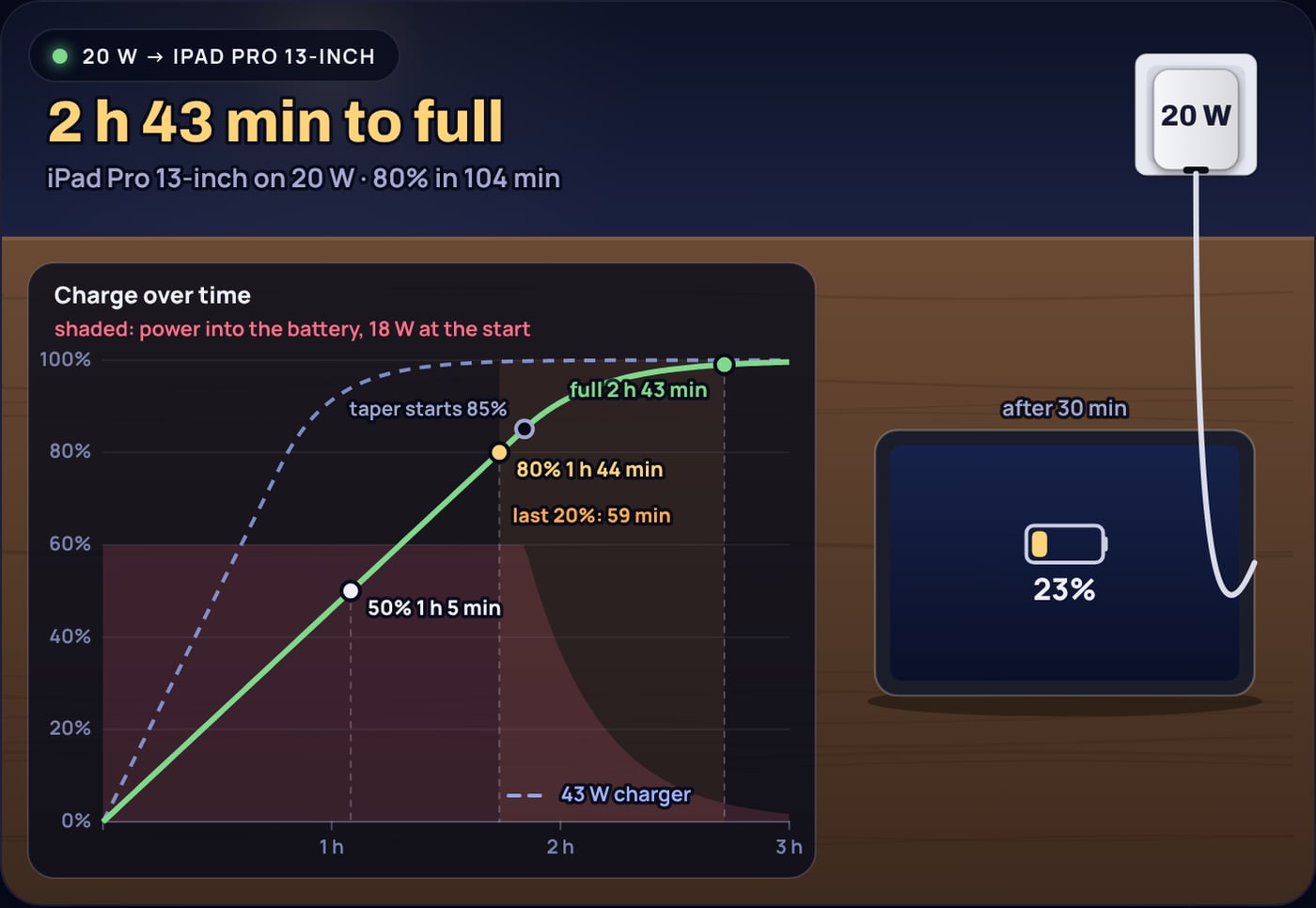
A tablet or laptop battery holds several times what a phone does, so a phone charger becomes the limit. The 13-inch iPad Pro has a 38.99 Wh battery, almost three iPhones' worth. On a 20 W phone charger it takes about 2 h 43 min to fill and gets to 23% in half an hour. With a 60 W capable adapter, the one Apple names for fast charging, it reaches 50% in 30 minutes and full in about 1 h 30 min.
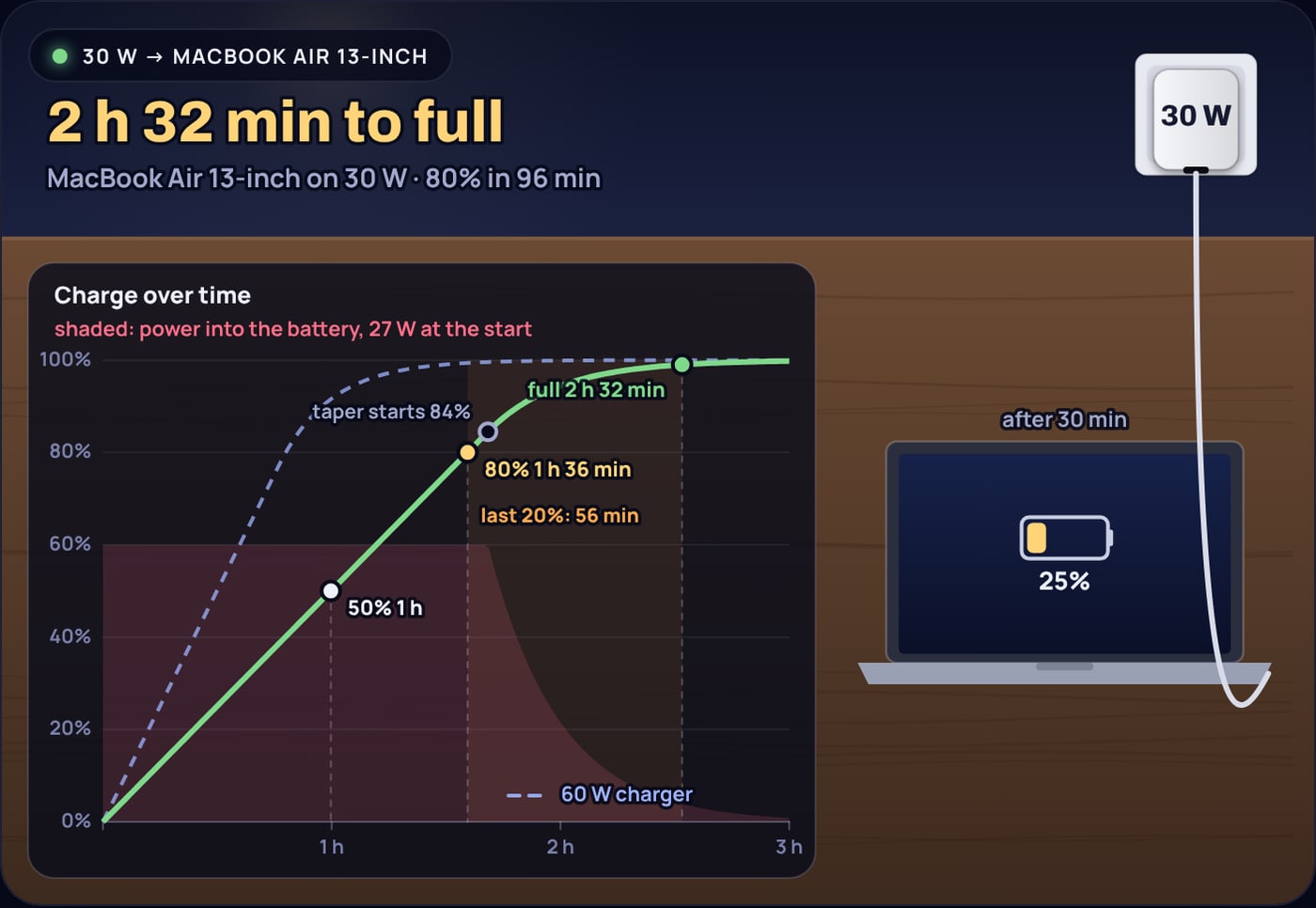
The MacBook Air 13-inch holds 53.8 Wh. Apple says it can fast charge to 50% in around 30 minutes with its 70 W adapter or bigger, and lists 67 W, 70 W, 96 W and 140 W adapters as fast-charge capable. The model puts its limit near 60 W, so all four give the same 1 h 29 min to full. On a 30 W charger it takes about 2 h 32 min, if the laptop is asleep. In use, a laptop's own consumption comes out of the same 30 W, and the charge rises more slowly or not at all.
Is a bigger charger safe for a phone?
Yes, if it follows USB Power Delivery. The negotiation described above is the safety mechanism: the charger supplies a higher voltage or current only when the device asks for it. A 100 W laptop charger connected to a phone delivers the phone's own 20 to 30 W and no more.
Heat matters more than the charger rating. Batteries age faster when charged hot, and phones reduce charging power when they get warm. Charging on a pillow, in a hot car or while gaming can make a fast charger slower than its rating, which is also one reason real charging times wander from any model.
What the calculator leaves out
- Use while charging. A screen, radios or a laptop under load take some of the power. The calculator assumes the device is idle.
- Temperature. Phones throttle charging when warm and slow down or pause when cold or very hot.
- Optimised charging. iPhone, Galaxy and Pixel can hold at 80% and finish shortly before you usually unplug. That is a setting, not physics.
- Cables and protocols. A cable rated for 60 W, or a charger without the PD or PPS profile the phone wants, can limit the power below both ratings.
- Battery age. An older battery holds less, so it fills sooner, but it may also reach its voltage limit earlier.
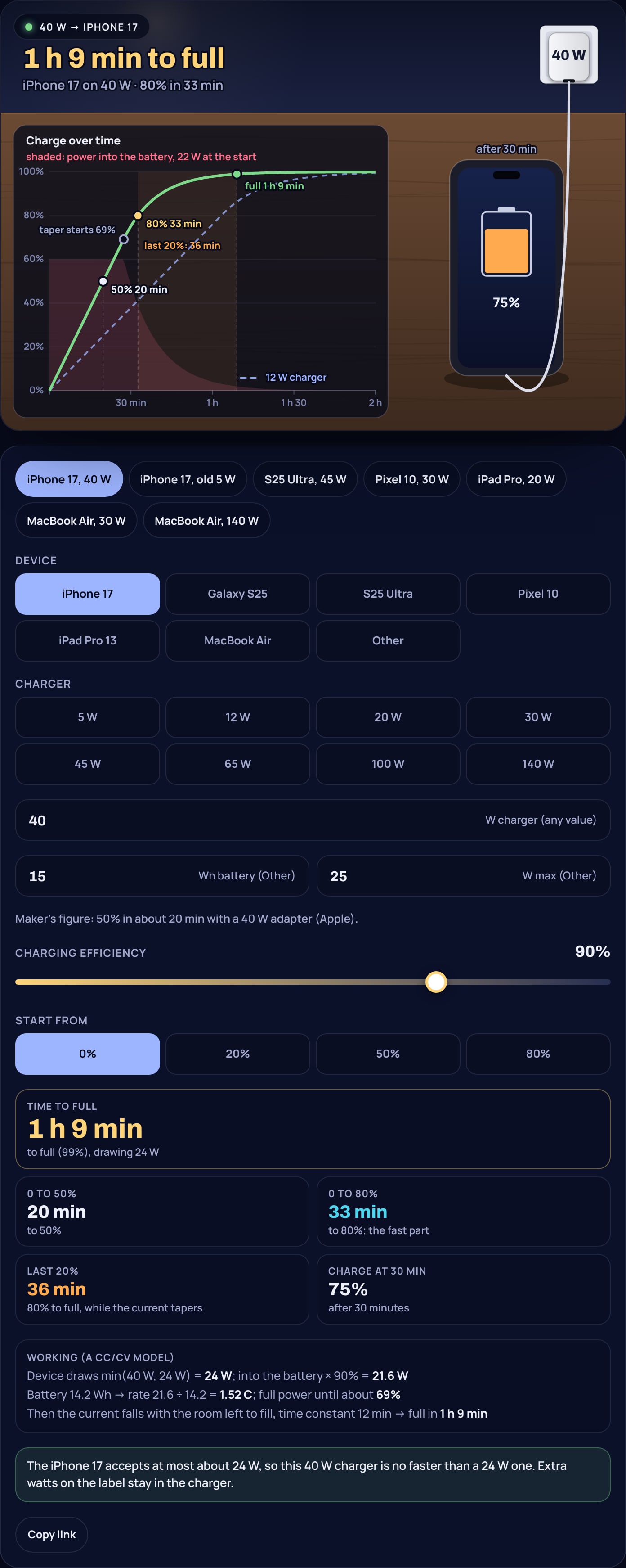
To see your own device and charger, open the charging time calculator, pick the device or type its battery Wh and limit, and try a few charger sizes. If you charge from a power bank, the power bank calculator shows how many charges it gives.
Sources
- Apple Support: Fast charge your iPhone (iPhone 17 up to 50% in around 20 minutes with a 40 W adapter or higher)
- Apple: iPad Pro tech specs (13-inch 38.99 Wh; up to 50% in around 30 minutes with an adapter capable of 60 W)
- Apple: MacBook Air tech specs (13-inch 53.8 Wh; fast-charge capable with a 70 W or higher USB PD power source)
- Apple Support: Fast charge your MacBook Air or MacBook Pro (up to 50% in around 30 minutes; adapters listed as fast-charge capable)
- Samsung Global Newsroom, Galaxy S25 series launch announcement, specification table (news.samsung.com/global) (S25 up to 50% in around 30 minutes with a 25 W adapter; S25 Ultra up to 65% in around 30 minutes with a 45 W adapter)
- Google Store: Pixel 10 tech specs (up to 55% in about 30 minutes with a 30 W USB-C PPS charger; 4,970 mAh typical)
- MacRumors: iPhone 17 battery capacities from Apple's EU energy labels (iPhone 17 3,692 mAh)
- USB Implementers Forum: USB Charger (USB Power Delivery) (up to 240 W; devices negotiate only the power they require)
- Battery University: BU-409 Charging Lithium-ion (constant current then saturation; higher current does not hasten full charge by much)
Frequently asked questions
Does a higher watt charger charge my phone faster?
Only up to the most power the phone accepts. An iPhone 17 takes about 24 W at most in this model, so a 40 W and a 100 W charger give the same time, about 1 h 9 min to full. Below that limit, more watts shorten the fast part of the charge.
Is it safe to charge a phone with a 65 W or 100 W laptop charger?
Yes, with a USB-C Power Delivery charger. The phone and charger agree on a voltage and power, and the phone takes only what it asks for. The extra capacity of the charger is simply not used.
Why does the last 20 percent take so long?
When a lithium ion cell reaches its maximum voltage, the charger holds that voltage and the current falls as the cell fills. That stage takes about the same time whatever the charger, about 36 to 46 minutes for an iPhone 17 on 12 W to 40 W in this model.
How long does a 5 W charger take to charge an iPhone 17?
About 3 h 47 min from empty in this model, against 1 h 17 min on 20 W and 1 h 9 min on 40 W. After half an hour on 5 W the phone is at about 16%.
Can I charge a MacBook Air with a phone charger?
Yes, slowly. In this model a 53.8 Wh MacBook Air takes about 2 h 32 min to fill on a 30 W charger while asleep, and about 1 h 29 min on the 70 W adapter Apple lists for fast charging.