How to Get Claude Fable 5 for Free: Mythos Class model

Anthropic recently launched Claude Fable 5, its most capable model to date. Capable of reasoning through complex codebase refactoring and autonomous coding tasks over days at a time, it represents a massive leap forward from the Opus class of models.
But Fable 5 is expensive. With API costs sitting at $10 per million input tokens and $50 per million output tokens, developers need a better way to test its capabilities before committing to enterprise contracts or high-tier usage fees.
Fortunately, you can access Claude Fable 5 for free right now. By utilizing the newly updated GitLab Duo Agent Platform free trial, developers unlock Anthropic’s flagship model at no cost for 30 days. Here is exactly how to set it up.
TL;DR: The Quick Shortcut
Want to skip the background information and jump straight to the model? Follow these five quick steps:
- Go to GitLab.com and click Start a free trial.
- Sign in with your Google account (or create a new GitLab account).
- Fill out the trial form and create a new project.
- From your project’s left sidebar, go to Settings > GitLab Duo, then click Configure features under Model Selection.
- Do not use the central dropdowns on the next page. Instead, click the GitLab Duo Chat icon on the far-right vertical toolbar, and select Claude Fable 5 from the chat panel’s dropdown.
What is Claude Fable 5?
Released by Anthropic on June 9, 2026, Claude Fable 5 is part of the new Mythos class of AI models. This is a tier that sits above their previous top tier Opus models. Fable 5 boasts a massive 1 million token context window and can generate up to 128,000 output tokens in a single request.
Unlike previous models that excelled primarily at quick chat interactions, Fable 5 is optimized for autonomous knowledge work and agentic coding. You can give the model a high level goal like “migrate this entire React application to Next.js”. Fable 5 will then plan its approach, check progress against its goals, and refine its work over extended periods. It functions essentially as an autonomous junior developer.
Fable 5 vs. Mythos 5
Claude Mythos 5 was released at the exact same time. The distinction between the two is straightforward.
- Claude Mythos 5: Available only through the limited release Project Glasswing, this model lacks certain safety classifiers.
- Claude Fable 5: This is the version made safe and generally available to the public. It features the exact same logic, reasoning, and capabilities as Mythos 5 but includes safety classifiers that can decline specific requests.
Because Fable 5 is the generally available model, it is the one integrated into enterprise platforms like AWS, Google Cloud, and GitLab Duo.
Why GitLab Duo is the Best Way to Access Fable 5
Normally, accessing a frontier model like Fable 5 requires either paying Anthropic directly for API usage, subscribing to a high tier plan, or using enterprise cloud providers like Amazon Bedrock.
GitLab Duo Agent Platform offers a much easier route.
GitLab has deeply integrated AI into its platform. Starting with GitLab 18.9, GitLab Ultimate free trials now include access to the GitLab Duo Agent Platform. If you are a new user or on the Free tier, you can sign up for a 30-day Ultimate trial on GitLab.com. This trial grants you access to nearly all Ultimate features, the Duo Agent Platform, and 24 GitLab credits per user to use premium models like Fable 5.
Setting Up Your Free Access
Follow these steps to set up your account and activate the trial properly.
Step 1: Start the Free Trial
- Go to GitLab.com.
- Click the Get free trial button (usually located in the top navigation bar or main hero section).
- You will be prompted to sign up or log in. You can easily click Continue with Google to use an existing Gmail account, or create an account using a different email address. Ensure you select the option to create a free account if you are starting fresh.
Step 2: Fill Out the Form and Create a Project
Once you are signed in, you need to provide some basic information to provision your environment.
- Fill out the required fields in the signup form (Role, reason for signing up, etc.). You can select options like “Software Developer” and “I want to learn the basics of Git.”
- When asked if you want to create a new project or join an existing one, choose to create a new project.
- Select whether this is for personal use or a company.
Step 3: Access the GitLab Duo Settings
Once inside your new project, you need to navigate to the specific settings area.
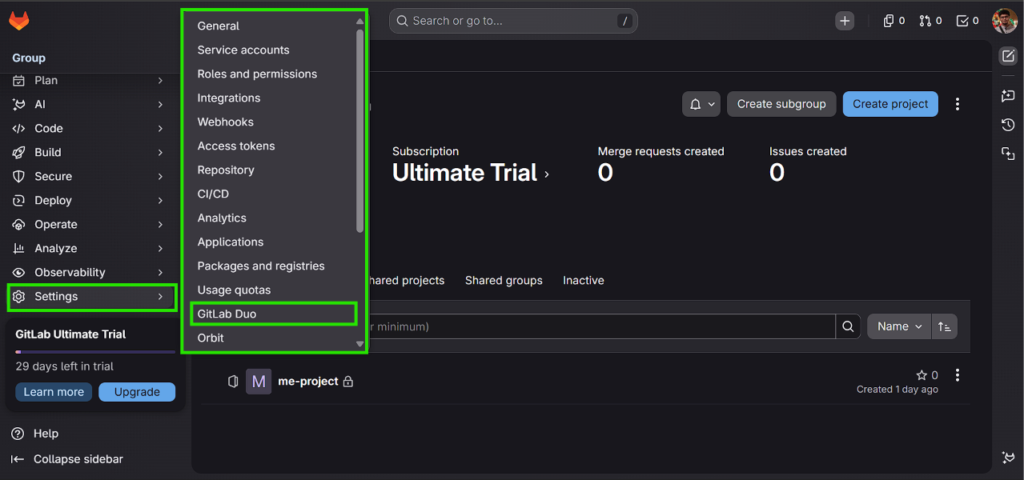
- Locate the left navigation panel.
- Scroll down, click on Settings, and select GitLab Duo from the expanded menu.
- On the GitLab Duo page, look for the Model Selection section and click the Configure features button.
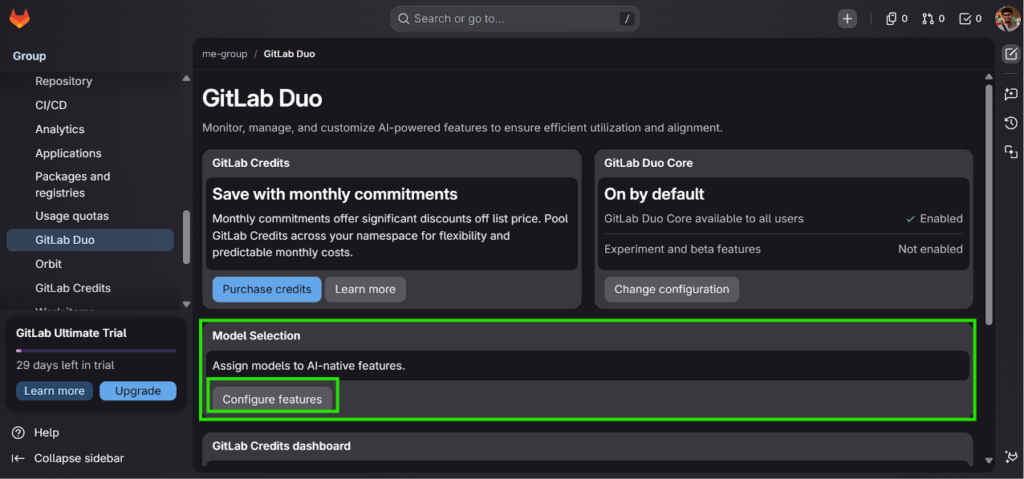
Note: In some cases, if your trial hasn’t automatically applied credits, you may see a prompt here to Start a free trial to activate your Ultimate features. If prompted, fill out the company details and activate the trial.
Step 4: Open Chat & Select Claude Fable 5
This is where many users get confused. You must use the correct right-hand panel, not the main page settings.
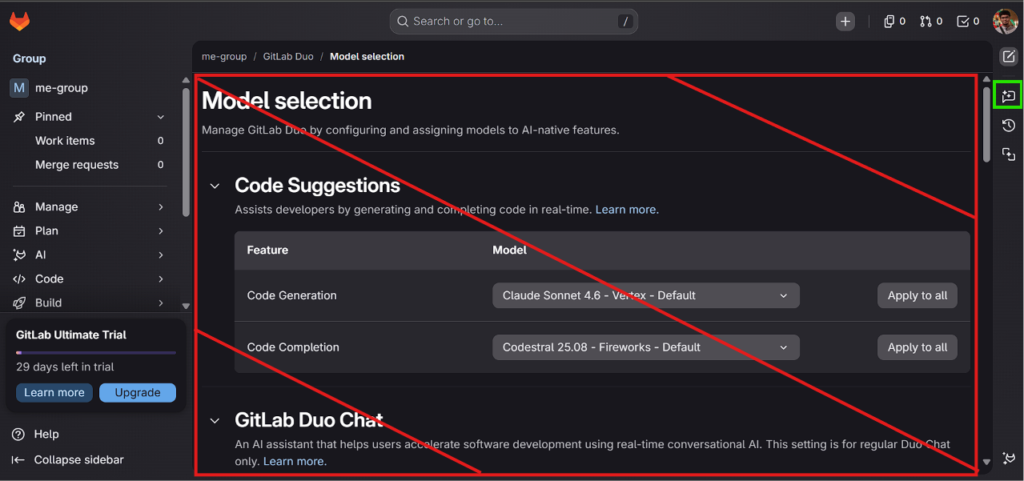
- On the “Model selection” page, you will see main dropdown menus for Code Suggestions and GitLab Duo Chat. Ignore these.
- Instead, look at the very far-right edge of your screen for the thin vertical toolbar.
- Click the GitLab Duo Chat icon (the small chat bubble with a sparkle).
- A chat panel will slide out on the right side. Use the model dropdown menu inside this chat interface to select Claude Fable 5.
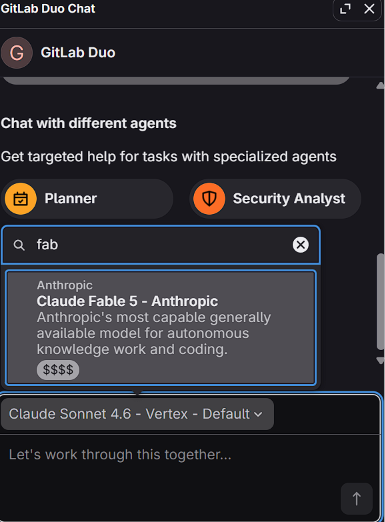
Step 5: Start Coding!
You are now ready to run complex prompt engineering and generate full stack applications for the next 30 days. You can type prompts directly into the chat, such as requesting a landing page for a specific type of business, and Fable 5 will generate the necessary code files (like index.html) which you can then copy into your own IDE.
What to Build with Fable 5
Here are a few ways developers are using this new access to speed up their workflow:
1. Full Codebase Refactoring
Previous models struggled to keep track of dependencies across dozens of files. With Fable 5, you can upload an entire legacy repository to your GitLab environment and instruct the agent to modernize the framework, update deprecated libraries, and rewrite the syntax to current standards. Fable 5 will methodically work through the files and maintain context the entire time.
2. Autonomous Bug Hunting
Integrate Fable 5 with your CI CD pipeline. When a build fails or a security vulnerability is detected, the Duo Agent Platform can use Fable 5 to analyze the error logs, trace the bug back to the source code, propose a fix, and even generate the merge request for you to review.
3. Rapid Prototyping from Scratch
Instead of writing boilerplate, you can give Fable 5 a detailed architectural prompt. For example: “Build a fully responsive, modern portfolio website using Next.js and Tailwind CSS. Include a dark mode toggle, a contact form that sanitizes input, and an interactive project gallery.” Fable 5 will generate the entire file architecture and the code to match.
Important Trial Limitations
There are a few details to keep in mind regarding the GitLab Duo trial so you do not get caught off guard:
- Time Limit: The trial lasts for exactly 30 days for GitLab.com users.
- Credit Limits: The trial provides 24 credits per user. Fable 5 is highly resource intensive. If you use Fable 5 for massive agentic tasks continuously, you may burn through these credits before the 30 days are up.
- Data Privacy: All prompts and responses are stored for up to 30 days to monitor for abuse per Anthropic guidelines. Do not put sensitive, proprietary, or highly confidential data into the model during this trial.
- End of Trial: When your 30 day trial ends, you lose access to the GitLab Duo Agent Platform and any remaining credits. You revert to the Free tier unless you upgrade.
Wrapping Up
Claude Fable 5 is moving developers away from simple chatting and toward true delegation of complex software engineering tasks.
While Fable 5 will eventually be gated behind steep usage fees and enterprise contracts, the current GitLab Duo Ultimate free trial offers a rare window for independent developers and small teams to experience this technology firsthand.
Whether you are looking to build a complex web application from scratch or refactor a massive legacy project, setting up this trial takes less than ten minutes. Grab your trial today, select Fable 5, and see what autonomous coding really looks like.