I Found a Way to Get $100 in Free Claude Opus 4.8 API Credits (No Credit Card Required)
Building software right now is tough on the wallet. Your biggest enemy is not a massive bug in your codebase or a tricky deployment pipeline. It is your API billing page.
Quick Setup
If you are in a rush and just want to know how to get started immediately, here are the compressed steps.
- Go to FreeModel and claim your USD 100 signup bonus.
- Generate your secret API key from the dashboard.
- Point your local tools to
https://api.freemodel.devand paste your new key. Scroll down for the full setup instructions for Claude Code and the OpenAI SDK.
Agentic coding tools like Claude Code and Cursor are completely changing how we build apps. But there is a massive catch because these tools are hungry. When an autonomous AI agent starts reading your entire local directory, parsing your documentation, and writing recursive debugging loops, it absolutely devours tokens.
If you are using frontier models like Claude Opus 4.8, which is arguably the gold standard for complex reasoning and architecture planning right now, you can easily rack up a USD30 bill in a single afternoon of aggressive coding. For solo developers, indie hackers, and bootstrapped startup founders, that burn rate is just not sustainable.
I spent the last few weeks hunting for a reliable workaround to get premium API access without bleeding cash. I finally found one that actually works, does not require a credit card, and is not locked behind a student email address.
It is a platform called FreeModel. Today I am going to show you exactly how to claim a USd 100 upfront API credit plus recurring weekly top ups, and plug it directly into your local development environment in under five minutes.
What is FreeModel and Why Are They Giving Away Credits?
When I first heard about FreeModel I was deeply skeptical. The AI space is full of platforms promising free API keys that turn out to be incredibly rate limited, terribly slow, or just thinly veiled scams designed to harvest your credit card info for a 3 day trial.
FreeModel is different. It acts as an API proxy router. Instead of going directly to Anthropic or OpenAI, you route your API calls through FreeModel endpoints. They aggregate massive enterprise usage which allows them to subsidize the cost for everyday developers like us.
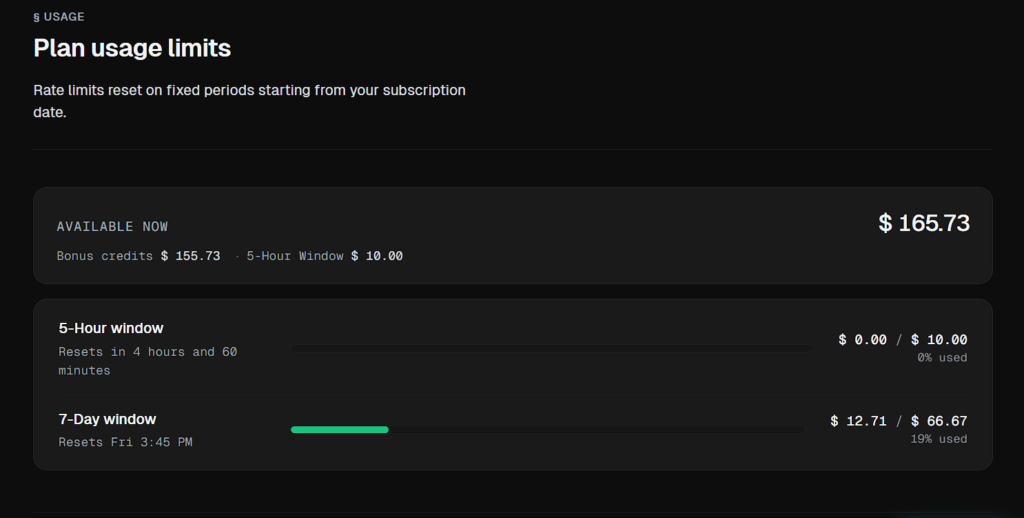
Here is the current credit structure they are offering for new signups. I verified this myself and the math is actually insane.
First is the USD 100 welcome drop. The second you create and verify your account, a USD 100 credit is dumped into your dashboard. You might see some older screenshots floating around the web claiming a USD 300 signup bonus, but the current active tier for new users sits at a very solid USD 100.
Second are the micro refills. Every 5 hours you get an automatic USD 10 added to your balance.
Third is the weekly top up. Every 7 days you receive a recurring USD 67 credit.
There is zero risk of forgetting to cancel a subscription and waking up to a surprise charge. It is completely free for everyone and you do not need a university email to prove you are a student.
If you want to stop rationing your API calls and just build, this is the way to do it. Here is the step by step guide to setting it up.
Step 1: Claiming Your USD 100 Account Balance
Before we touch any code or open the terminal, we need to get your account funded.
- You need to use a valid promotional link to trigger the onboarding credits. Head over to this specific registration page: Claim Your FreeModel Credits Here.
- Sign up using your preferred method. I usually just use GitHub for a seamless login but email works fine too.
- Once you are looking at your new dashboard and verifying that your USD 100 is sitting there, navigate to the API Keys section.
- Generate a new secret key. Treat this exactly like you would an Anthropic or OpenAI key. Never commit it to a public GitHub repo.
Now that we have the key, let us wire it up. The beauty of FreeModel is that it acts as a direct drop in replacement. You do not have to learn a new SDK or rewrite your app logic. You just change the base URL.
Step 2: Integrating FreeModel with Claude Code
If you are using Anthropic official CLI tool Claude Code, you know how magical it is to have an AI natively editing your files from the terminal. By default, Claude Code bills straight to your Anthropic console. We are going to hijack that and point it to FreeModel to eat up those free credits instead.
All you have to do is override two environment variables in your terminal.
If you are on macOS or Linux, open up your terminal and run these two commands. Make sure to replace YOUR_FREEMODEL_API_KEY with the actual key you generated in Step 1.
export ANTHROPIC_API_KEY="YOUR_FREEMODEL_API_KEY"
export ANTHROPIC_BASE_URL="[https://api.freemodel.dev](https://api.freemodel.dev)"
export ANTHROPIC_API_KEY="YOUR_FREEMODEL_API_KEY"
export ANTHROPIC_BASE_URL="[https://api.freemodel.dev](https://api.freemodel.dev)"If you are on Windows using PowerShell:
\$env:ANTHROPIC_API_KEY="YOUR_FREEMODEL_API_KEY"
\$env:ANTHROPIC_BASE_URL="[https://api.freemodel.dev](https://api.freemodel.dev)"
\$env:ANTHROPIC_API_KEY="YOUR_FREEMODEL_API_KEY"
\$env:ANTHROPIC_BASE_URL="[https://api.freemodel.dev](https://api.freemodel.dev)"That is it. Seriously. The next time you type claude in that terminal session, it will hit the FreeModel servers and use your free Opus 4.8 credits.
A quick developer pro tip: Exporting variables manually every time you open a new terminal window gets annoying fast. If you want this to be permanent, add those export lines to the bottom of your shell profile like ~/.zshrc or ~/.bashrc. Once you save it, run source ~/.zshrc, and your machine will permanently default to the free FreeModel endpoint.
If you get stuck, FreeModel actually has a great documentation page specifically for this setup. You can check their official Claude Code integration docs here.
Step 3: Using the OpenAI SDK to Call Claude Opus 4.8
Here is where things get really interesting. Let us say you are building a SaaS app, a Next.js backend, or a Python script. A vast majority of developers originally built their apps using the official OpenAI SDK because it was the first to market.
Switching your entire codebase from OpenAI formatting to Anthropic SDK can be a massive headache.
FreeModel solves this. Because they act as a proxy layer, they accept OpenAI formatted API calls, translate them on the backend, and route them to Claude Opus 4.8. You get the power of Anthropic reasoning engine using OpenAI familiar code structure.
Here is how you do it in Python. Notice how we just change the base URL and specifically request the Opus model:
from openai import OpenAI

# Initialize the standard OpenAI client but point it to FreeModel
client = OpenAI(
    api_key="YOUR_FREEMODEL_API_KEY",
    base_url="[https://api.freemodel.dev/v1](https://api.freemodel.dev/v1)" # Do not forget the /v1 at the end!
)

# Make your request asking for Claude Opus
response = client.chat.completions.create(
    model="claude-opus-4.8",
    messages=[
        {"role": "system", "content": "You are a senior DevOps engineer."},
        {"role": "user", "content": "Write a highly optimized Dockerfile for a Node.js app."}
    ]
)

print(response.choices[0].message.content)
from openai import OpenAI
# Initialize the standard OpenAI client but point it to FreeModel
client = OpenAI(
api_key="YOUR_FREEMODEL_API_KEY",
base_url="[https://api.freemodel.dev/v1](https://api.freemodel.dev/v1)" # Do not forget the /v1 at the end!
)
# Make your request asking for Claude Opus
response = client.chat.completions.create(
model="claude-opus-4.8",
messages=[
{"role": "system", "content": "You are a senior DevOps engineer."},
{"role": "user", "content": "Write a highly optimized Dockerfile for a Node.js app."}
]
)
print(response.choices[0].message.content)And if you are living in the JavaScript or TypeScript ecosystem, here is the Node.js equivalent:
import OpenAI from 'openai';

// Point the client to the proxy URL
const openai = new OpenAI({
  apiKey: 'YOUR_FREEMODEL_API_KEY',
  baseURL: '[https://api.freemodel.dev/v1](https://api.freemodel.dev/v1)',
});

async function runAgent() {
  const completion = await openai.chat.completions.create({
    model: 'claude-opus-4.8',
    messages: [
      { role: 'system', content: 'You are an advanced React architecture expert.' },
      { role: 'user', content: 'Design a scalable global state management hook.' },
    ],
  });

  console.log(completion.choices[0].message.content);
}

runAgent();
import OpenAI from 'openai';
// Point the client to the proxy URL
const openai = new OpenAI({
apiKey: 'YOUR_FREEMODEL_API_KEY',
baseURL: '[https://api.freemodel.dev/v1](https://api.freemodel.dev/v1)',
});
async function runAgent() {
const completion = await openai.chat.completions.create({
model: 'claude-opus-4.8',
messages: [
{ role: 'system', content: 'You are an advanced React architecture expert.' },
{ role: 'user', content: 'Design a scalable global state management hook.' },
],
});
console.log(completion.choices[0].message.content);
}
runAgent();By simply updating two strings for the URL and the API Key, your existing applications are instantly upgraded to use one of the smartest LLMs on the planet completely subsidized.
How to Make Your USD 100 Last Longer
Even though FreeModel is giving away USD 100 upfront and throwing an extra USD 10 at you every five hours, you still should not be wasteful. Claude Opus 4.8 is a heavyweight model, and if you are not careful, you can chew through your balance faster than you think.
Here are three rules I follow to keep my API usage lean.
First, use aggressive ignore files. If you are using CLI agents that read your local files, make sure your .gitignore or .cursorignore files are airtight. You do not want the AI reading your node_modules, minified build folders, or image assets. You pay for every token it reads. Do not pay the AI to read an SVG file.
Second, format your prompts ruthlessly. LLMs love to yap. They want to give you five paragraphs explaining the code they just wrote. Add a system prompt that says to return ONLY raw code with no markdown formatting, no explanations, and no pleasantries. You pay for generated tokens, so cut the small talk.
Third, step down for simple tasks. You do not need Opus 4.8 to fix a missing semicolon or write a basic regex. Save Opus for complex architectural decisions, deep debugging, and multi file refactoring.
Conclusion
The barrier to building incredible AI software used to be technical knowledge. Today, the barrier is often just the cost of compute. Platforms like FreeModel are leveling the playing field, allowing independent devs to hack together enterprise grade applications from their bedrooms without racking up thousands of dollars in credit card debt.
If you have been putting off that side project because you did not want to pay Anthropic API fees, consider this your green light.
Go grab your USD 100 credit here, swap out your base URLs, and get back to building.